Python 与 MongoDB⚓︎
Python 是一种后端技术,可以连接不同的数据库应用。它可以连接 SQL 和 NoSQL 数据库。本节我们把 Python 连接到 NoSQL 数据库 MongoDB。
MongoDB⚓︎
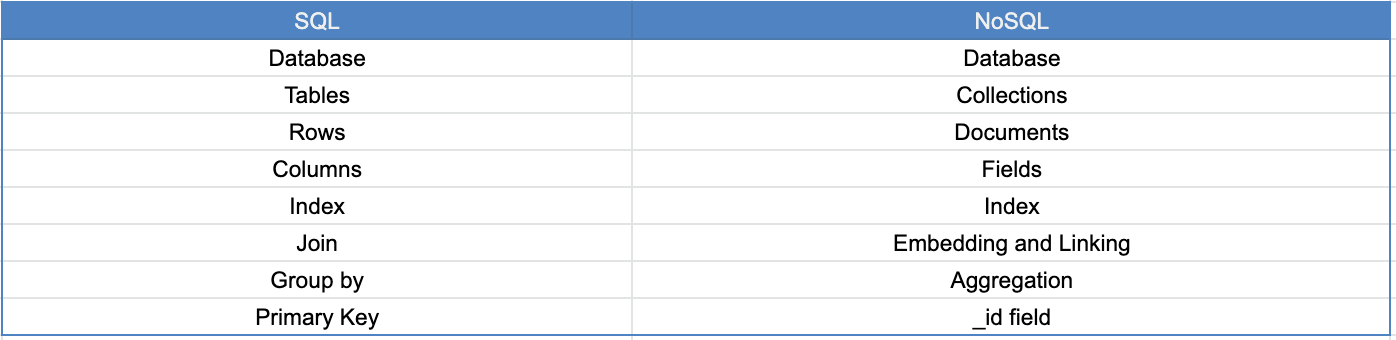
MongoDB 是一种 NoSQL 数据库。MongoDB 以类似 JSON 的文档形式存储数据,因此非常灵活且易于扩展。让我们看看 SQL 与 NoSQL 数据库的不同术语。下表展示了 SQL 与 NoSQL 数据库的区别。
SQL 与 NoSQL⚓︎
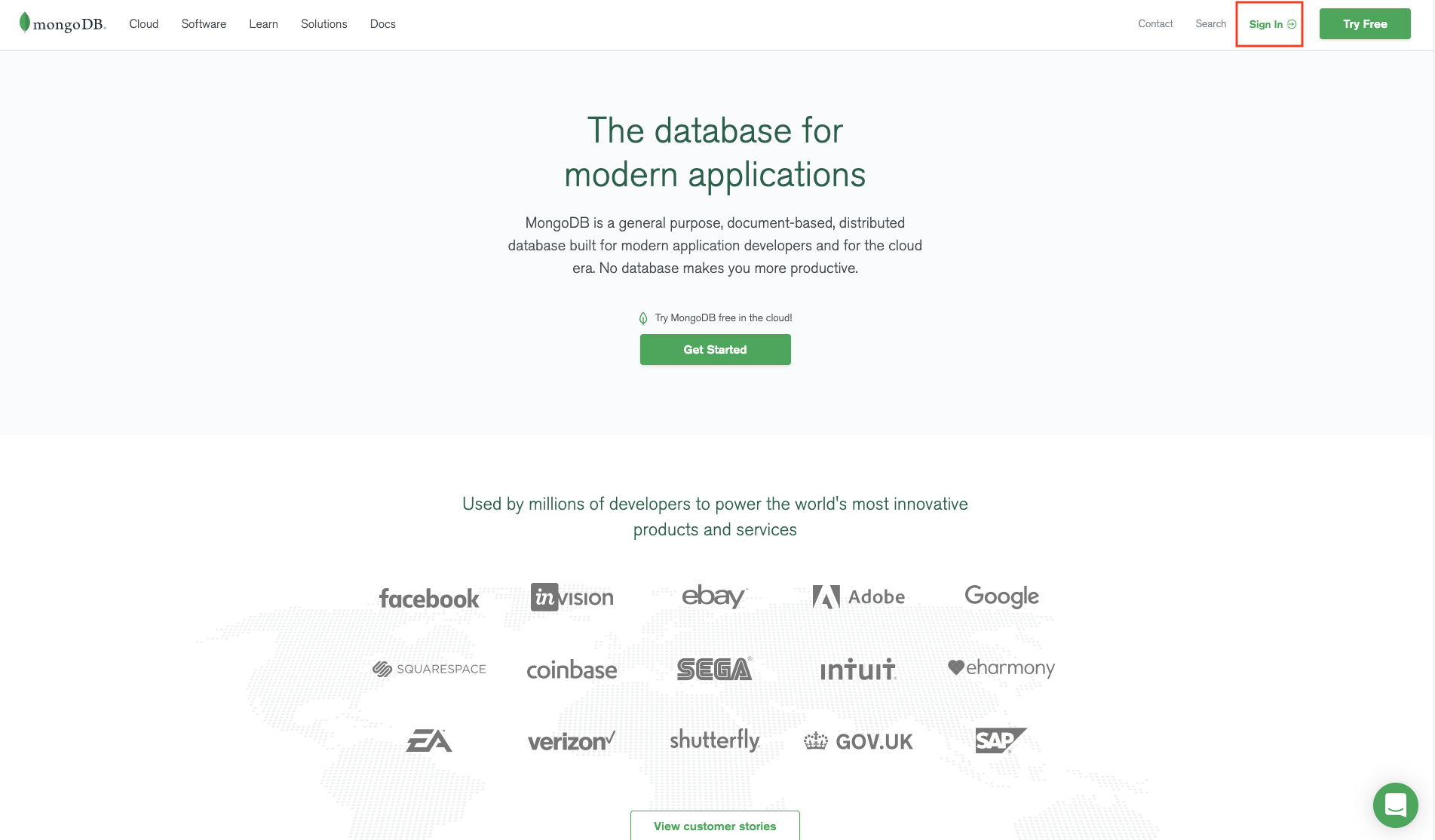
本节我们将聚焦 NoSQL 数据库 MongoDB。请到 mongoDB 注册:点击 Sign in,然后在下一页点击 Register。
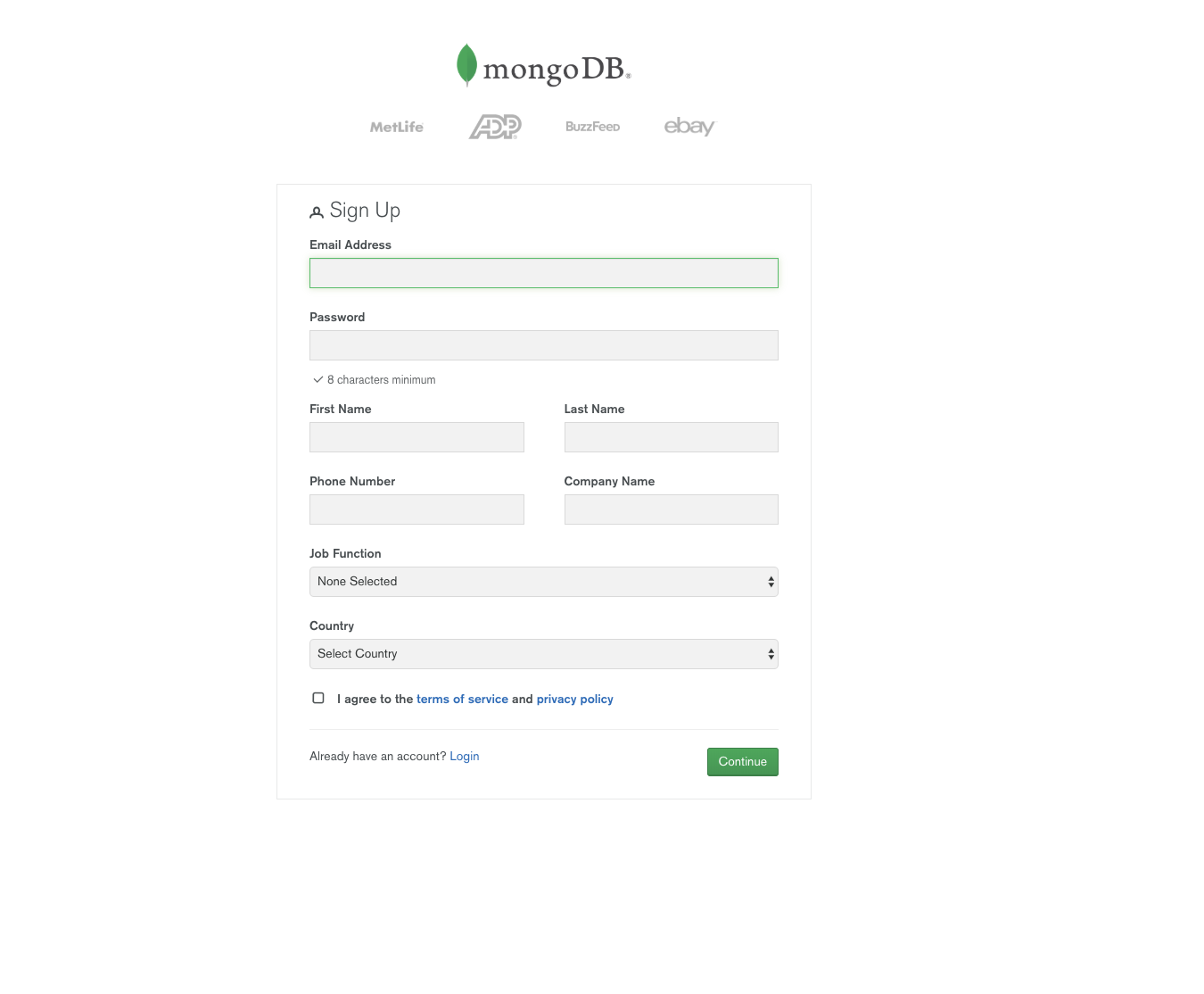
填写字段并点击 Continue。
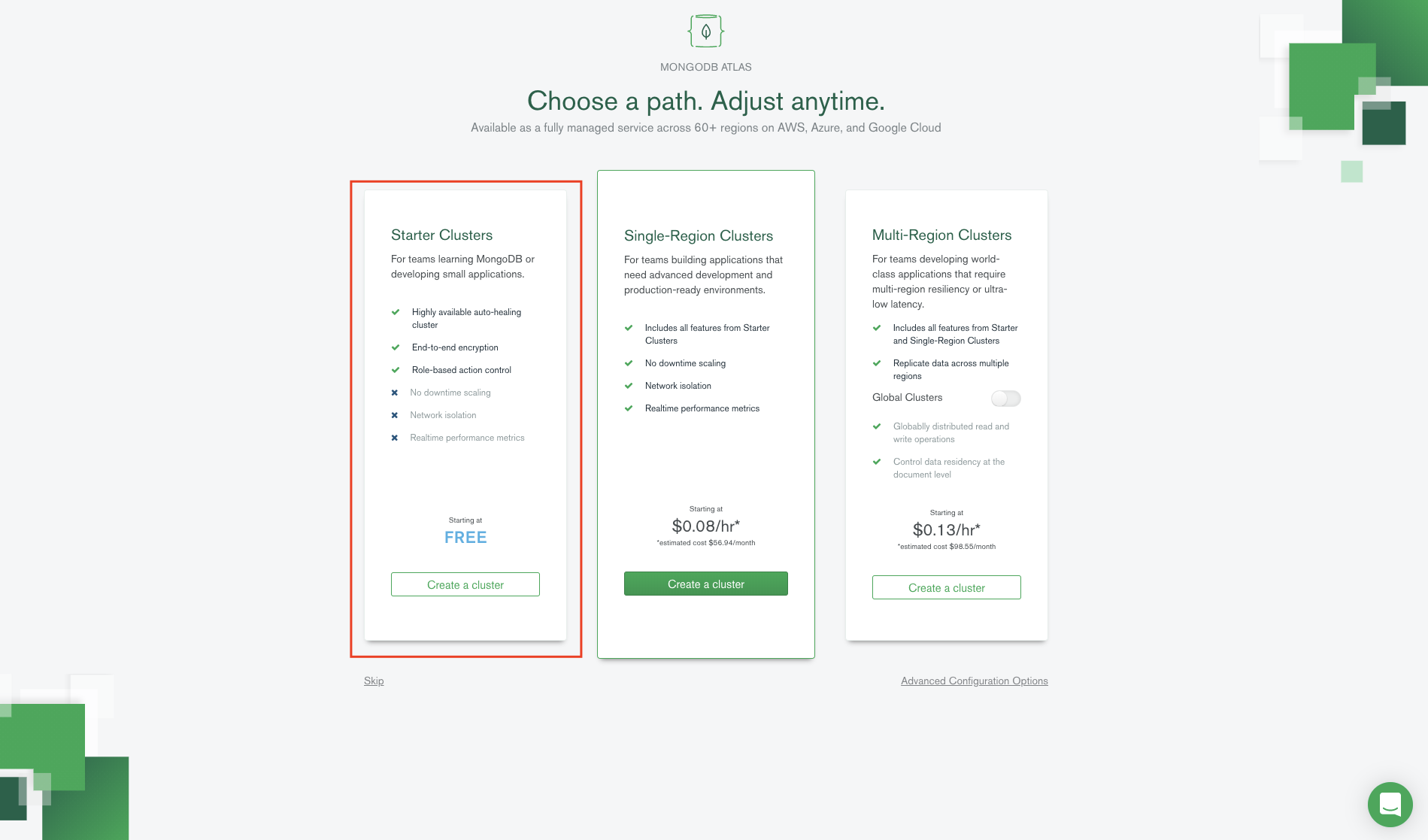
选择免费计划。
选择就近的免费区域,并为集群起一个名字。
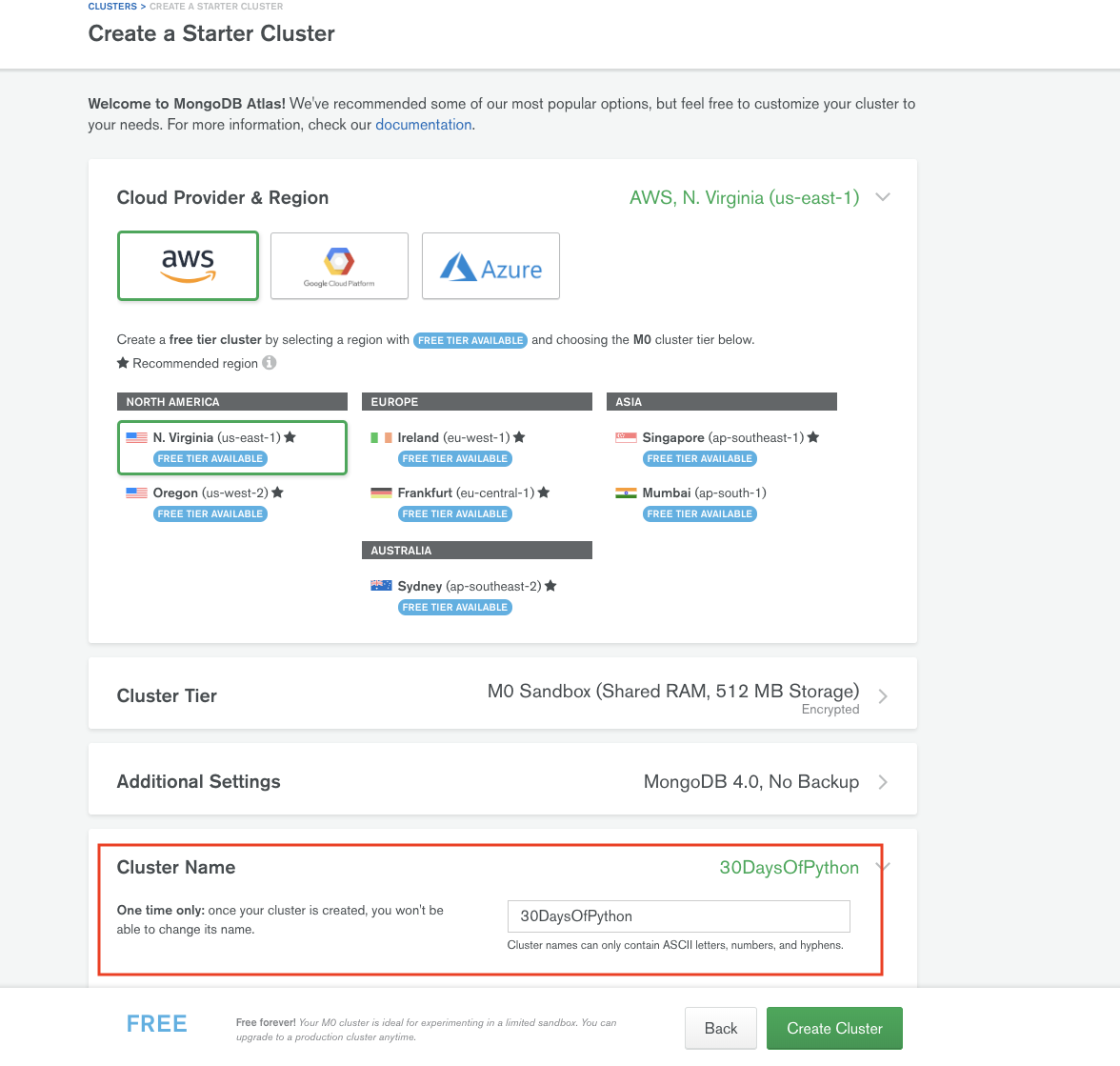
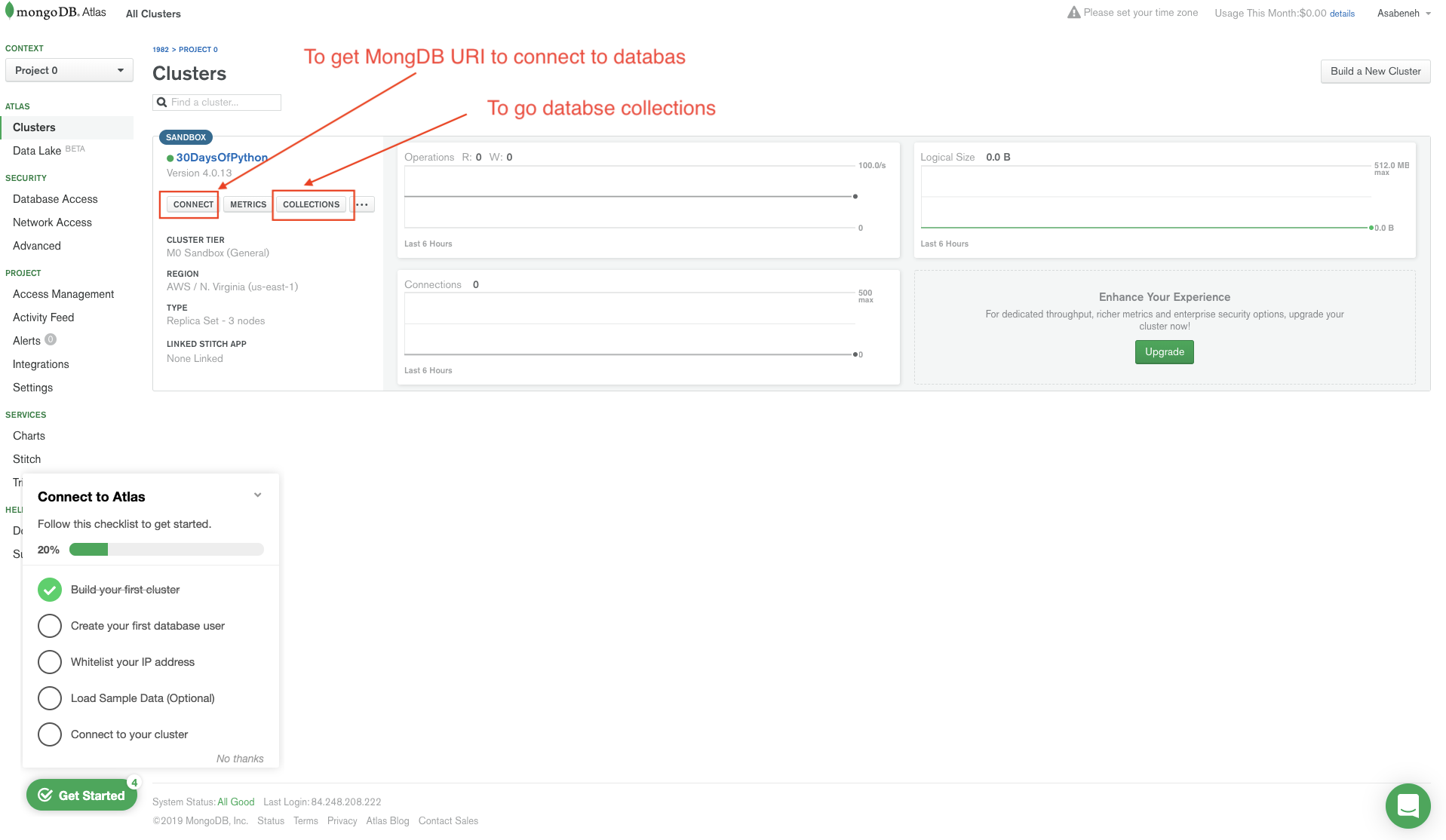
现在已创建免费沙箱环境。
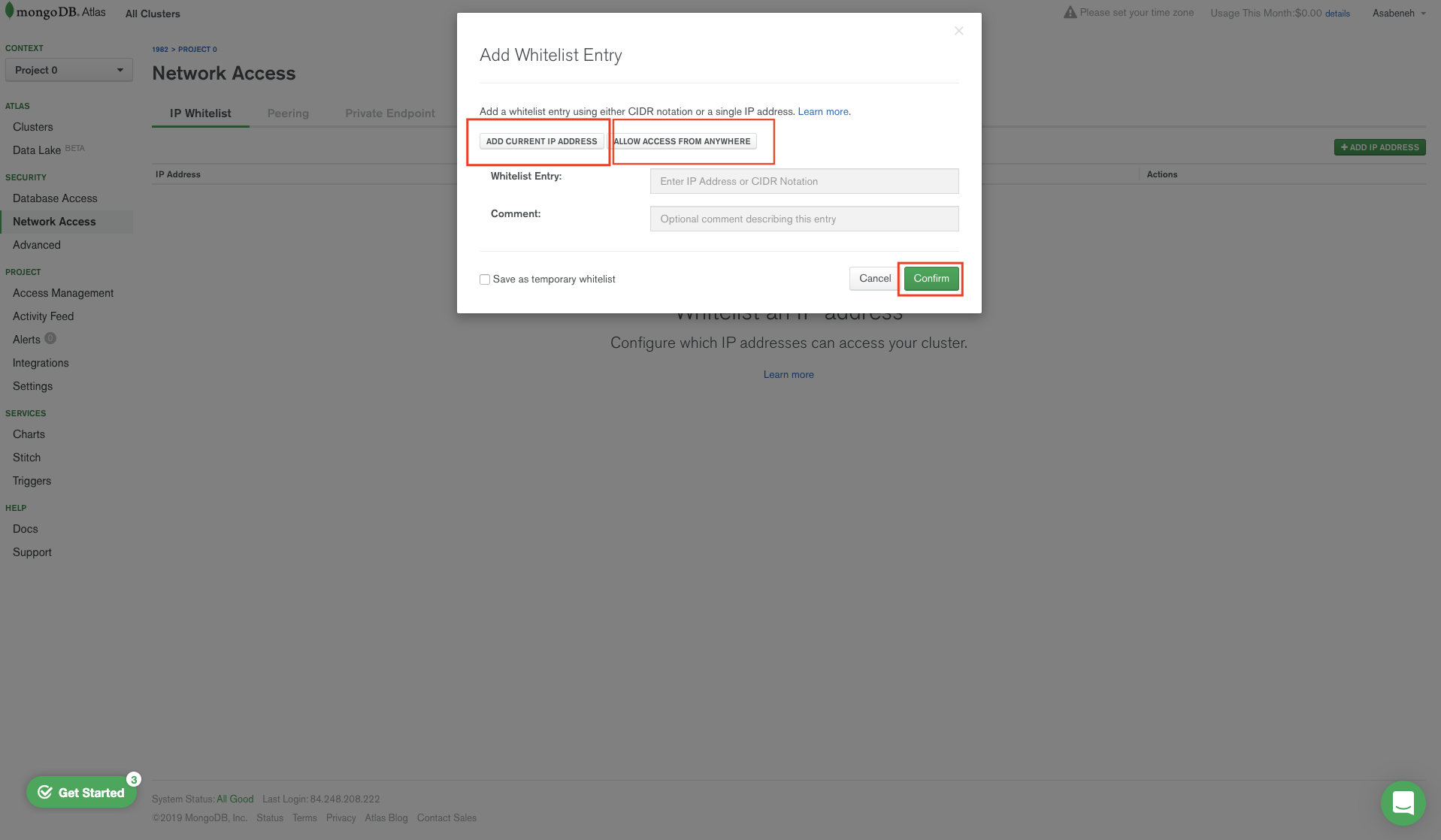
允许所有本地主机访问。
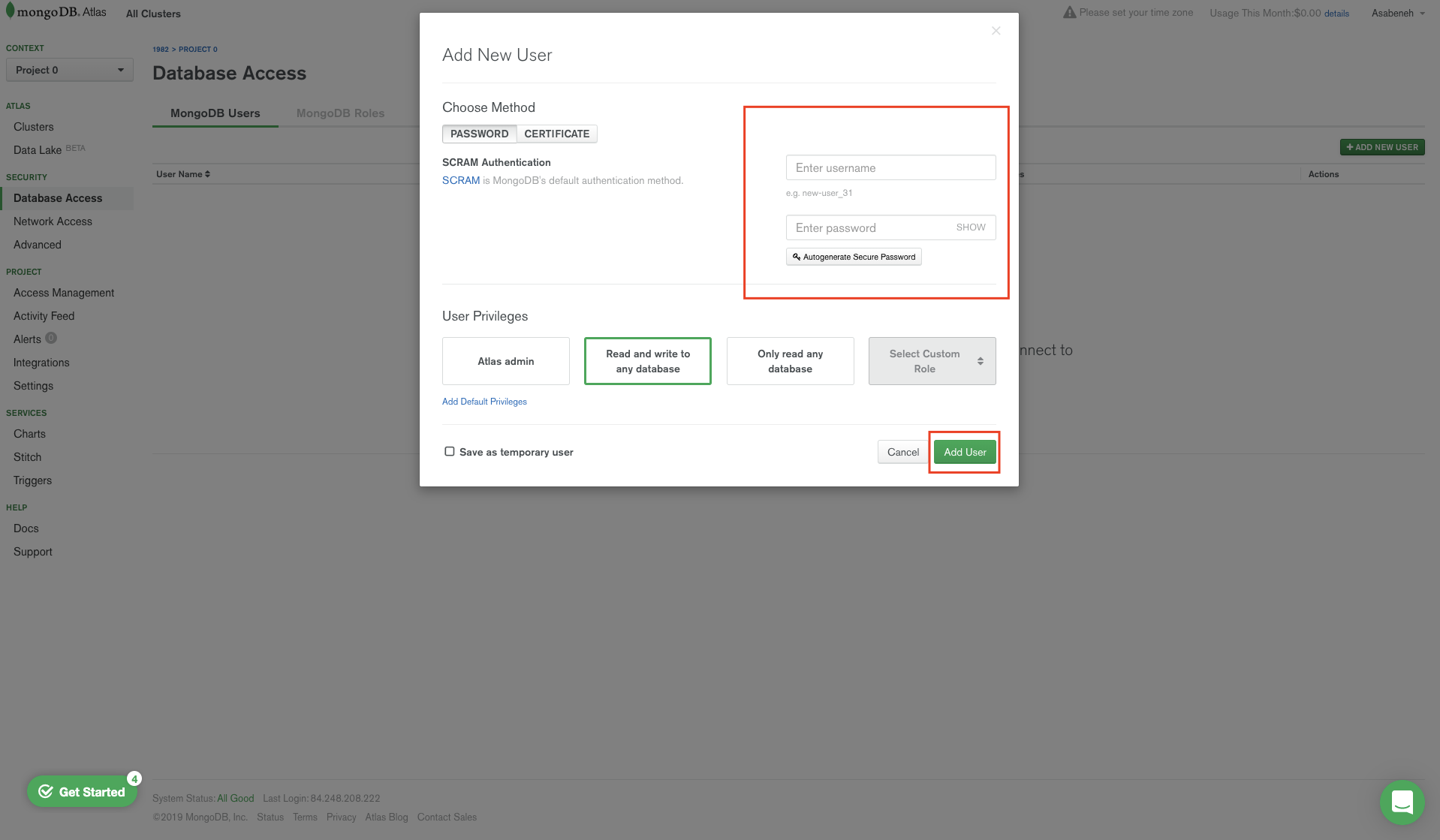
添加用户和密码。
创建 MongoDB URI 链接。
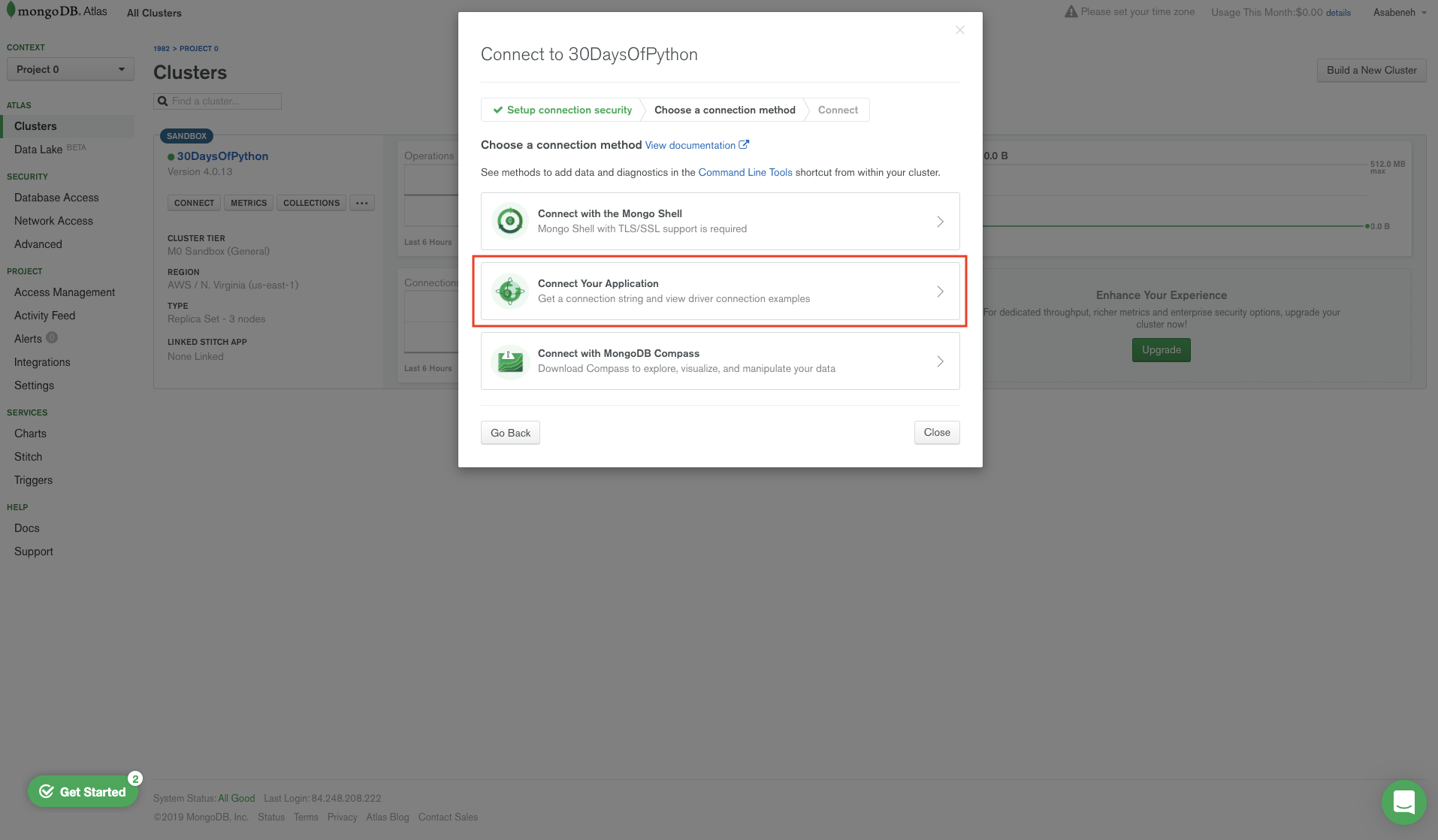
选择 Python 3.6 或更高版本的驱动。
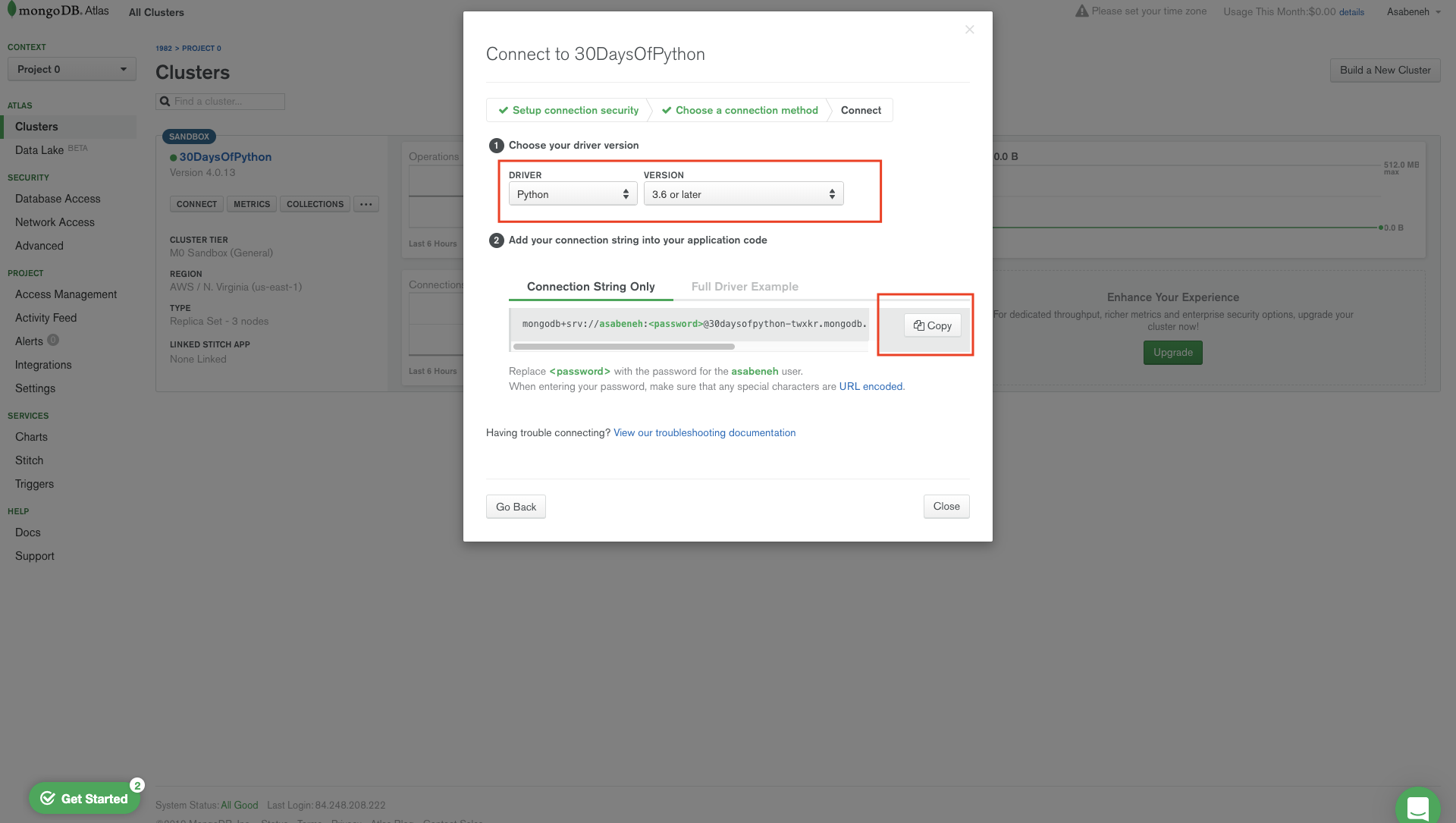
获取连接字符串(MongoDB URI)⚓︎
复制连接字符串链接,你会得到类似这样的内容:
mongodb+srv://asabeneh:<password>@30daysofpython-twxkr.mongodb.net/test?retryWrites=true&w=majority
不必担心这个 URL,它只是用来把应用连接到 MongoDB 的手段。 把密码占位符替换为你添加用户时使用的密码。
示例:
mongodb+srv://asabeneh:123123123@30daysofpython-twxkr.mongodb.net/test?retryWrites=true&w=majority
现在我已全部替换完成,密码是 123123,数据库名是 thirty_days_python。这只是示例,你的密码必须比示例密码更强。
Python 需要 MongoDB 驱动才能访问 MongoDB 数据库。我们将使用 pymongo 和 dnspython 把应用连接到 MongoDB。在项目目录中安装 pymongo 和 dnspython。
pip install pymongo dnspython
要使用 mongodb+srv:// URI,必须安装 "dnspython" 模块。dnspython 是 Python 的 DNS 工具包,支持几乎所有记录类型。
将 Flask 应用连接到 MongoDB 集群⚓︎
# let's import the flask
from flask import Flask, render_template
import os # importing operating system module
MONGODB_URI = 'mongodb+srv://asabeneh:your_password_goes_here@30daysofpython-twxkr.mongodb.net/test?retryWrites=true&w=majority'
client = pymongo.MongoClient(MONGODB_URI)
print(client.list_database_names())

app = Flask(__name__)
if __name__ == '__main__':
    # for deployment we use the environ
    # to make it work for both production and development
    port = int(os.environ.get("PORT", 5000))
    app.run(debug=True, host='0.0.0.0', port=port)
运行上面的代码时,我们会得到默认的 MongoDB 数据库。
['admin', 'local']
创建数据库和集合⚓︎
让我们创建一个数据库;在 MongoDB 中,若数据库和集合不存在,会在使用时创建。我们创建一个名为 thirty_days_of_python 的数据库和 students 集合。
创建数据库:
db = client.name_of_databse # we can create a database like this or the second way
db = client['name_of_database']
# let's import the flask
from flask import Flask, render_template
import os # importing operating system module
MONGODB_URI = 'mongodb+srv://asabeneh:your_password_goes_here@30daysofpython-twxkr.mongodb.net/test?retryWrites=true&w=majority'
client = pymongo.MongoClient(MONGODB_URI)
# Creating database
db = client.thirty_days_of_python
# Creating students collection and inserting a document
db.students.insert_one({'name': 'Asabeneh', 'country': 'Finland', 'city': 'Helsinki', 'age': 250})
print(client.list_database_names())

app = Flask(__name__)
if __name__ == '__main__':
    # for deployment we use the environ
    # to make it work for both production and development
    port = int(os.environ.get("PORT", 5000))
    app.run(debug=True, host='0.0.0.0', port=port)
创建数据库后,我们还创建了 students 集合,并用 insert_one() 方法插入了一条文档。 现在,数据库 thirty_days_of_python 和 students 集合已创建,文档也已插入。 检查你的 MongoDB 集群,你会同时看到数据库和集合。集合内部会有一条文档。
['thirty_days_of_python', 'admin', 'local']
如果在 MongoDB 集群上看到这些,说明你已成功创建了数据库和集合。
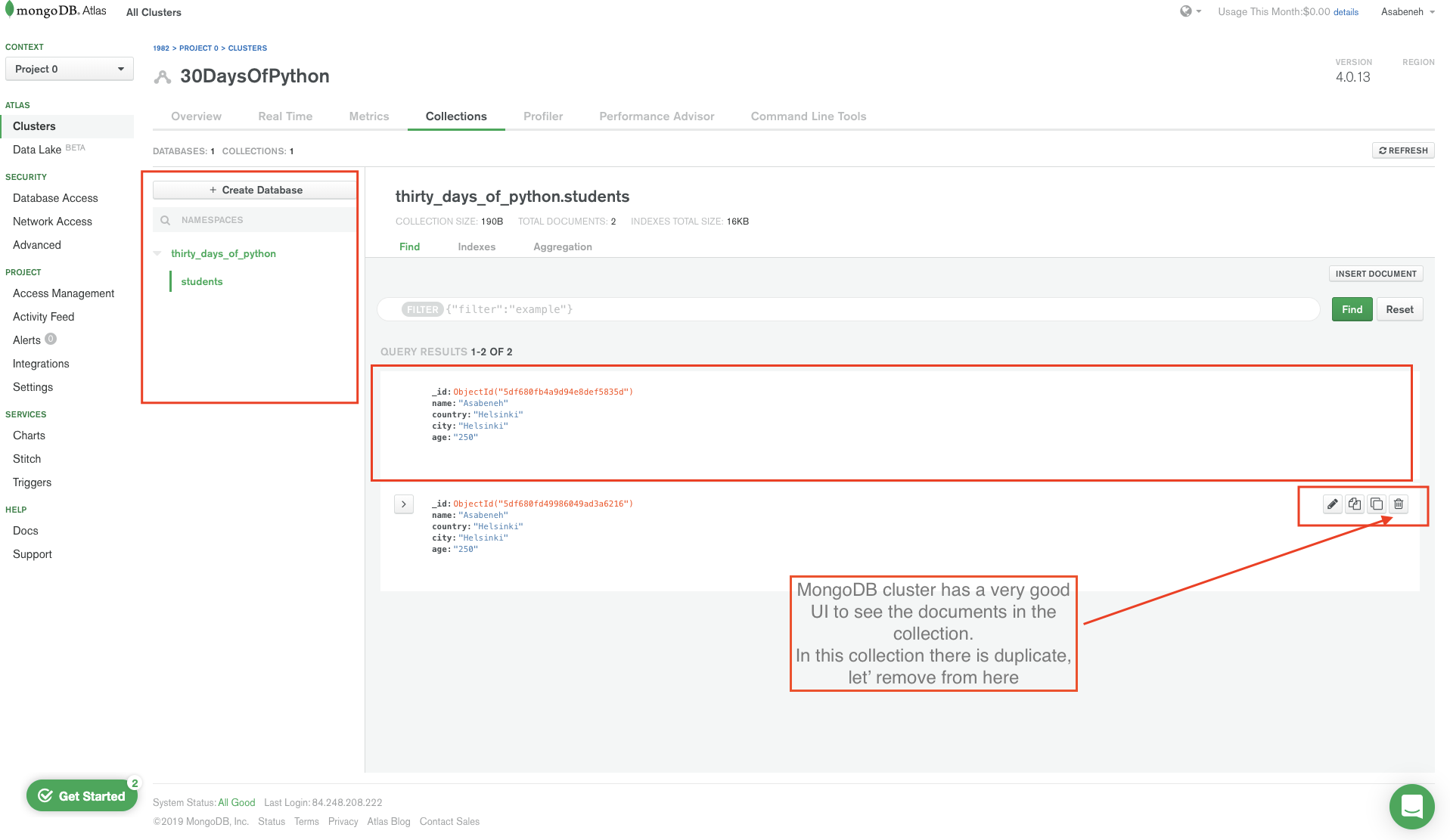
从图中可以看到,文档创建时带有一个很长的 id,它充当主键。每次我们创建文档时,MongoDB 都会为它创建唯一 id。
向集合插入多条文档⚓︎
insert_one() 方法一次插入一条;若想一次插入多条文档,可用 insert_many() 方法或 for 循环。 我们可以用 for 循环一次插入多条文档。
# let's import the flask
from flask import Flask, render_template
import os # importing operating system module
MONGODB_URI = 'mongodb+srv://asabeneh:your_password_goes_here@30daysofpython-twxkr.mongodb.net/test?retryWrites=true&w=majority'
client = pymongo.MongoClient(MONGODB_URI)

students = [
        {'name':'David','country':'UK','city':'London','age':34},
        {'name':'John','country':'Sweden','city':'Stockholm','age':28},
        {'name':'Sami','country':'Finland','city':'Helsinki','age':25},
    ]
for student in students:
    db.students.insert_one(student)


app = Flask(__name__)
if __name__ == '__main__':
    # for deployment we use the environ
    # to make it work for both production and development
    port = int(os.environ.get("PORT", 5000))
    app.run(debug=True, host='0.0.0.0', port=port)
MongoDB Find⚓︎
find() 和 findOne() 是在 MongoDB 数据库集合中查找数据的常用方法,类似于 MySQL 中的 SELECT 语句。 让我们用 find_one() 方法获取集合中的一条文档。
- *find_one({"_id": ObjectId("id"}): 若未提供 id,则获取第一条匹配项
# let's import the flask
from flask import Flask, render_template
import os # importing operating system module
MONGODB_URI = 'mongodb+srv://asabeneh:your_password_goes_here@30daysofpython-twxkr.mongodb.net/test?retryWrites=true&w=majority'
client = pymongo.MongoClient(MONGODB_URI)
db = client['thirty_days_of_python'] # accessing the database
student = db.students.find_one()
print(student)


app = Flask(__name__)
if __name__ == '__main__':
    # for deployment we use the environ
    # to make it work for both production and development
    port = int(os.environ.get("PORT", 5000))
    app.run(debug=True, host='0.0.0.0', port=port)
{'_id': ObjectId('5df68a21f106fe2d315bbc8b'), 'name': 'Asabeneh', 'country': 'Helsinki', 'city': 'Helsinki', 'age': 250}
上面的查询返回第一条记录,但我们可以用特定的 _id 定位具体文档。我们用 David 的 id 获取 David 对象。 '_id':ObjectId('5df68a23f106fe2d315bbc8c')
# let's import the flask
from flask import Flask, render_template
import os # importing operating system module
from bson.objectid import ObjectId # id object
MONGODB_URI = 'mongodb+srv://asabeneh:your_password_goes_here@30daysofpython-twxkr.mongodb.net/test?retryWrites=true&w=majority'
client = pymongo.MongoClient(MONGODB_URI)
db = client['thirty_days_of_python'] # accessing the database
student = db.students.find_one({'_id':ObjectId('5df68a23f106fe2d315bbc8c')})
print(student)

app = Flask(__name__)
if __name__ == '__main__':
    # for deployment we use the environ
    # to make it work for both production and development
    port = int(os.environ.get("PORT", 5000))
    app.run(debug=True, host='0.0.0.0', port=port)
{'_id': ObjectId('5df68a23f106fe2d315bbc8c'), 'name': 'David', 'country': 'UK', 'city': 'London', 'age': 34}
通过上面的示例,我们学会了如何使用 find_one()。接下来看 find()。
- find(): 若不传入查询对象,则返回集合中的所有结果。该对象是 pymongo.cursor 对象。
# let's import the flask
from flask import Flask, render_template
import os # importing operating system module

MONGODB_URI = 'mongodb+srv://asabeneh:your_password_goes_here@30daysofpython-twxkr.mongodb.net/test?retryWrites=true&w=majority'
client = pymongo.MongoClient(MONGODB_URI)
db = client['thirty_days_of_python'] # accessing the database
students = db.students.find()
for student in students:
    print(student)

app = Flask(__name__)
if __name__ == '__main__':
    # for deployment we use the environ
    # to make it work for both production and development
    port = int(os.environ.get("PORT", 5000))
    app.run(debug=True, host='0.0.0.0', port=port)
{'_id': ObjectId('5df68a21f106fe2d315bbc8b'), 'name': 'Asabeneh', 'country': 'Finland', 'city': 'Helsinki', 'age': 250}
{'_id': ObjectId('5df68a23f106fe2d315bbc8c'), 'name': 'David', 'country': 'UK', 'city': 'London', 'age': 34}
{'_id': ObjectId('5df68a23f106fe2d315bbc8d'), 'name': 'John', 'country': 'Sweden', 'city': 'Stockholm', 'age': 28}
{'_id': ObjectId('5df68a23f106fe2d315bbc8e'), 'name': 'Sami', 'country': 'Finland', 'city': 'Helsinki', 'age': 25}
我们可以通过在 find({}, {}) 中传入第二个对象来指定返回哪些字段。0 表示不包含,1 表示包含,但不能混用 0 和 1,_id 除外。
# let's import the flask
from flask import Flask, render_template
import os # importing operating system module

MONGODB_URI = 'mongodb+srv://asabeneh:your_password_goes_here@30daysofpython-twxkr.mongodb.net/test?retryWrites=true&w=majority'
client = pymongo.MongoClient(MONGODB_URI)
db = client['thirty_days_of_python'] # accessing the database
students = db.students.find({}, {"_id":0,  "name": 1, "country":1}) # 0 means not include and 1 means include
for student in students:
    print(student)

app = Flask(__name__)
if __name__ == '__main__':
    # for deployment we use the environ
    # to make it work for both production and development
    port = int(os.environ.get("PORT", 5000))
    app.run(debug=True, host='0.0.0.0', port=port)
{'name': 'Asabeneh', 'country': 'Finland'}
{'name': 'David', 'country': 'UK'}
{'name': 'John', 'country': 'Sweden'}
{'name': 'Sami', 'country': 'Finland'}
带查询条件的 Find⚓︎
在 MongoDB 中,find 接受查询对象。我们可以传入查询对象,过滤出想要的文档。
# let's import the flask
from flask import Flask, render_template
import os # importing operating system module

MONGODB_URI = 'mongodb+srv://asabeneh:your_password_goes_here@30daysofpython-twxkr.mongodb.net/test?retryWrites=true&w=majority'
client = pymongo.MongoClient(MONGODB_URI)
db = client['thirty_days_of_python'] # accessing the database

query = {
    "country":"Finland"
}
students = db.students.find(query)

for student in students:
    print(student)


app = Flask(__name__)
if __name__ == '__main__':
    # for deployment we use the environ
    # to make it work for both production and development
    port = int(os.environ.get("PORT", 5000))
    app.run(debug=True, host='0.0.0.0', port=port)
{'_id': ObjectId('5df68a21f106fe2d315bbc8b'), 'name': 'Asabeneh', 'country': 'Finland', 'city': 'Helsinki', 'age': 250}
{'_id': ObjectId('5df68a23f106fe2d315bbc8e'), 'name': 'Sami', 'country': 'Finland', 'city': 'Helsinki', 'age': 25}
带修饰符的查询:
# let's import the flask
from flask import Flask, render_template
import os # importing operating system module
import pymongo

MONGODB_URI = 'mongodb+srv://asabeneh:your_password_goes_here@30daysofpython-twxkr.mongodb.net/test?retryWrites=true&w=majority'
client = pymongo.MongoClient(MONGODB_URI)
db = client['thirty_days_of_python'] # accessing the database

query = {
    "city":"Helsinki"
}
students = db.students.find(query)
for student in students:
    print(student)


app = Flask(__name__)
if __name__ == '__main__':
    # for deployment we use the environ
    # to make it work for both production and development
    port = int(os.environ.get("PORT", 5000))
    app.run(debug=True, host='0.0.0.0', port=port)
{'_id': ObjectId('5df68a21f106fe2d315bbc8b'), 'name': 'Asabeneh', 'country': 'Finland', 'city': 'Helsinki', 'age': 250}
{'_id': ObjectId('5df68a23f106fe2d315bbc8e'), 'name': 'Sami', 'country': 'Finland', 'city': 'Helsinki', 'age': 25}
带修饰符的 Find 查询⚓︎
# let's import the flask
from flask import Flask, render_template
import os # importing operating system module
import pymongo

MONGODB_URI = 'mongodb+srv://asabeneh:your_password_goes_here@30daysofpython-twxkr.mongodb.net/test?retryWrites=true&w=majority'
client = pymongo.MongoClient(MONGODB_URI)
db = client['thirty_days_of_python'] # accessing the database
query = {
    "country":"Finland",
    "city":"Helsinki"
}
students = db.students.find(query)
for student in students:
    print(student)


app = Flask(__name__)
if __name__ == '__main__':
    # for deployment we use the environ
    # to make it work for both production and development
    port = int(os.environ.get("PORT", 5000))
    app.run(debug=True, host='0.0.0.0', port=port)
{'_id': ObjectId('5df68a21f106fe2d315bbc8b'), 'name': 'Asabeneh', 'country': 'Finland', 'city': 'Helsinki', 'age': 250}
{'_id': ObjectId('5df68a23f106fe2d315bbc8e'), 'name': 'Sami', 'country': 'Finland', 'city': 'Helsinki', 'age': 25}
带修饰符的查询:
# let's import the flask
from flask import Flask, render_template
import os # importing operating system module
import pymongo

MONGODB_URI = 'mongodb+srv://asabeneh:your_password_goes_here@30daysofpython-twxkr.mongodb.net/test?retryWrites=true&w=majority'
client = pymongo.MongoClient(MONGODB_URI)
db = client['thirty_days_of_python'] # accessing the database
query = {"age":{"$gt":30}}
students = db.students.find(query)
for student in students:
    print(student)

app = Flask(__name__)
if __name__ == '__main__':
    # for deployment we use the environ
    # to make it work for both production and development
    port = int(os.environ.get("PORT", 5000))
    app.run(debug=True, host='0.0.0.0', port=port)
{'_id': ObjectId('5df68a21f106fe2d315bbc8b'), 'name': 'Asabeneh', 'country': 'Finland', 'city': 'Helsinki', 'age': 250}
{'_id': ObjectId('5df68a23f106fe2d315bbc8c'), 'name': 'David', 'country': 'UK', 'city': 'London', 'age': 34}
# let's import the flask
from flask import Flask, render_template
import os # importing operating system module
import pymongo

MONGODB_URI = 'mongodb+srv://asabeneh:your_password_goes_here@30daysofpython-twxkr.mongodb.net/test?retryWrites=true&w=majority'
client = pymongo.MongoClient(MONGODB_URI)
db = client['thirty_days_of_python'] # accessing the database
query = {"age":{"$gt":30}}
students = db.students.find(query)
for student in students:
    print(student)
{'_id': ObjectId('5df68a23f106fe2d315bbc8d'), 'name': 'John', 'country': 'Sweden', 'city': 'Stockholm', 'age': 28}
{'_id': ObjectId('5df68a23f106fe2d315bbc8e'), 'name': 'Sami', 'country': 'Finland', 'city': 'Helsinki', 'age': 25}
限制文档数量⚓︎
我们可以使用 limit() 方法限制返回的文档数量。
# let's import the flask
from flask import Flask, render_template
import os # importing operating system module
import pymongo

MONGODB_URI = 'mongodb+srv://asabeneh:your_password_goes_here@30daysofpython-twxkr.mongodb.net/test?retryWrites=true&w=majority'
client = pymongo.MongoClient(MONGODB_URI)
db = client['thirty_days_of_python'] # accessing the database
db.students.find().limit(3)
带排序的 Find⚓︎
默认情况下,排序为升序。可以通过添加 -1 参数改为降序。
# let's import the flask
from flask import Flask, render_template
import os # importing operating system module
import pymongo

MONGODB_URI = 'mongodb+srv://asabeneh:your_password_goes_here@30daysofpython-twxkr.mongodb.net/test?retryWrites=true&w=majority'
client = pymongo.MongoClient(MONGODB_URI)
db = client['thirty_days_of_python'] # accessing the database
students = db.students.find().sort('name')
for student in students:
    print(student)


students = db.students.find().sort('name',-1)
for student in students:
    print(student)

students = db.students.find().sort('age')
for student in students:
    print(student)

students = db.students.find().sort('age',-1)
for student in students:
    print(student)

app = Flask(__name__)
if __name__ == '__main__':
    # for deployment we use the environ
    # to make it work for both production and development
    port = int(os.environ.get("PORT", 5000))
    app.run(debug=True, host='0.0.0.0', port=port)
升序
{'_id': ObjectId('5df68a21f106fe2d315bbc8b'), 'name': 'Asabeneh', 'country': 'Finland', 'city': 'Helsinki', 'age': 250}
{'_id': ObjectId('5df68a23f106fe2d315bbc8c'), 'name': 'David', 'country': 'UK', 'city': 'London', 'age': 34}
{'_id': ObjectId('5df68a23f106fe2d315bbc8d'), 'name': 'John', 'country': 'Sweden', 'city': 'Stockholm', 'age': 28}
{'_id': ObjectId('5df68a23f106fe2d315bbc8e'), 'name': 'Sami', 'country': 'Finland', 'city': 'Helsinki', 'age': 25}
降序
{'_id': ObjectId('5df68a23f106fe2d315bbc8e'), 'name': 'Sami', 'country': 'Finland', 'city': 'Helsinki', 'age': 25}
{'_id': ObjectId('5df68a23f106fe2d315bbc8d'), 'name': 'John', 'country': 'Sweden', 'city': 'Stockholm', 'age': 28}
{'_id': ObjectId('5df68a23f106fe2d315bbc8c'), 'name': 'David', 'country': 'UK', 'city': 'London', 'age': 34}
{'_id': ObjectId('5df68a21f106fe2d315bbc8b'), 'name': 'Asabeneh', 'country': 'Finland', 'city': 'Helsinki', 'age': 250}
带查询条件的更新⚓︎
我们将使用 update_one() 方法更新一条记录。它接受两个对象:一个是查询条件,另一个是新对象。 第一个人 Asabeneh 的年龄很不合理,让我们更新 Asabeneh 的年龄。
# let's import the flask
from flask import Flask, render_template
import os # importing operating system module
import pymongo

MONGODB_URI = 'mongodb+srv://asabeneh:your_password_goes_here@30daysofpython-twxkr.mongodb.net/test?retryWrites=true&w=majority'
client = pymongo.MongoClient(MONGODB_URI)
db = client['thirty_days_of_python'] # accessing the database

query = {'age':250}
new_value = {'$set':{'age':38}}

db.students.update_one(query, new_value)
# lets check the result if the age is modified
for student in db.students.find():
    print(student)


app = Flask(__name__)
if __name__ == '__main__':
    # for deployment we use the environ
    # to make it work for both production and development
    port = int(os.environ.get("PORT", 5000))
    app.run(debug=True, host='0.0.0.0', port=port)
{'_id': ObjectId('5df68a21f106fe2d315bbc8b'), 'name': 'Asabeneh', 'country': 'Finland', 'city': 'Helsinki', 'age': 38}
{'_id': ObjectId('5df68a23f106fe2d315bbc8c'), 'name': 'David', 'country': 'UK', 'city': 'London', 'age': 34}
{'_id': ObjectId('5df68a23f106fe2d315bbc8d'), 'name': 'John', 'country': 'Sweden', 'city': 'Stockholm', 'age': 28}
{'_id': ObjectId('5df68a23f106fe2d315bbc8e'), 'name': 'Sami', 'country': 'Finland', 'city': 'Helsinki', 'age': 25}
当我们想一次更新多条文档时,使用 update_many() 方法。
删除文档⚓︎
delete_one() 方法删除一条文档。delete_one() 接受一个查询对象参数,只会删除第一条匹配项。 让我们从集合中删除一个 John。
# let's import the flask
from flask import Flask, render_template
import os # importing operating system module
import pymongo

MONGODB_URI = 'mongodb+srv://asabeneh:your_password_goes_here@30daysofpython-twxkr.mongodb.net/test?retryWrites=true&w=majority'
client = pymongo.MongoClient(MONGODB_URI)
db = client['thirty_days_of_python'] # accessing the database

query = {'name':'John'}
db.students.delete_one(query)

for student in db.students.find():
    print(student)
# lets check the result if the age is modified
for student in db.students.find():
    print(student)


app = Flask(__name__)
if __name__ == '__main__':
    # for deployment we use the environ
    # to make it work for both production and development
    port = int(os.environ.get("PORT", 5000))
    app.run(debug=True, host='0.0.0.0', port=port)
{'_id': ObjectId('5df68a21f106fe2d315bbc8b'), 'name': 'Asabeneh', 'country': 'Finland', 'city': 'Helsinki', 'age': 38}
{'_id': ObjectId('5df68a23f106fe2d315bbc8c'), 'name': 'David', 'country': 'UK', 'city': 'London', 'age': 34}
{'_id': ObjectId('5df68a23f106fe2d315bbc8e'), 'name': 'Sami', 'country': 'Finland', 'city': 'Helsinki', 'age': 25}
可以看到,John 已从集合中删除。
当我们想删除多条文档时,使用 delete_many() 方法,它接受一个查询对象。若向 delete_many({}) 传入空查询对象,则会删除集合中的所有文档。
删除集合⚓︎
使用 drop() 方法可以从数据库中删除一个集合。
# let's import the flask
from flask import Flask, render_template
import os # importing operating system module
import pymongo

MONGODB_URI = 'mongodb+srv://asabeneh:your_password_goes_here@30daysofpython-twxkr.mongodb.net/test?retryWrites=true&w=majority'
client = pymongo.MongoClient(MONGODB_URI)
db = client['thirty_days_of_python'] # accessing the database
db.students.drop()
现在,我们已从数据库中删除了 students 集合。