29 building API
构建 API⚓︎
本节我们将介绍使用 HTTP 请求方法 GET、PUT、POST 和 DELETE 操作数据的 RESTful API。
RESTful API 是一种应用程序接口(API),通过 HTTP 请求来 GET、PUT、POST 和 DELETE 数据。此前我们已经学过 Python、Flask 和 MongoDB。我们将运用所学知识,用 Python Flask 和 MongoDB 开发一个 RESTful API。凡是具备 CRUD(Create、Read、Update、Delete)操作的应用,通常都有 API,用来从数据库创建、获取、更新或删除数据。
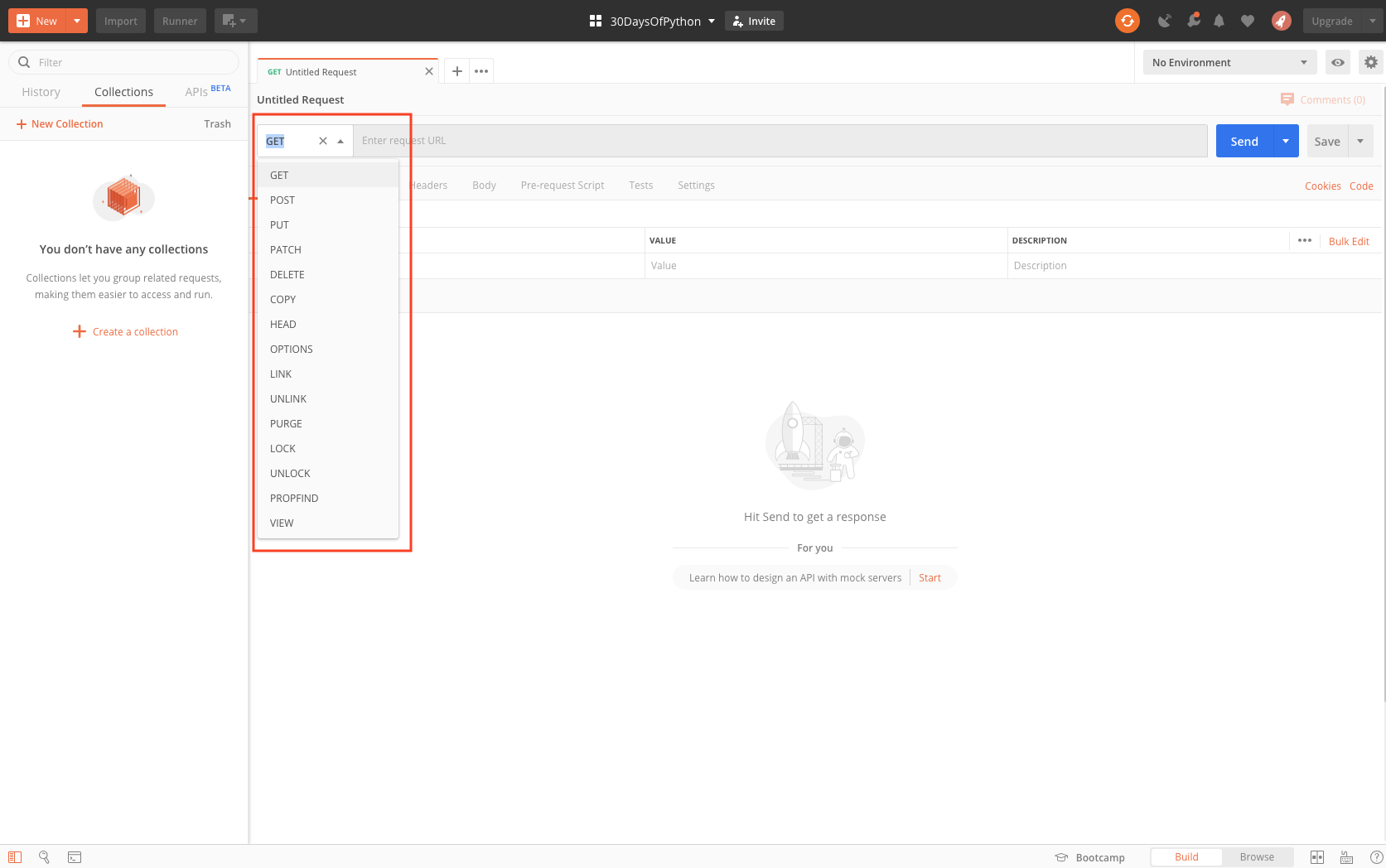
浏览器通常只能处理 GET 请求。因此,我们需要一个能帮我们处理所有请求方法(GET、POST、PUT、DELETE)的工具。
API 示例
- Countries API: https://restcountries.eu/rest/v2/all
- Cats breed API: https://api.thecatapi.com/v1/breeds
Postman 是 API 开发中非常常用的工具。若要完成本节内容,需要 下载 Postman。Postman 的替代品是 Insomnia。
API 的结构⚓︎
API 端点是一个 URL,可用于检索、创建、更新或删除资源。结构大致如下: 示例: https://api.twitter.com/1.1/lists/members.json 返回指定列表的成员。私有列表成员仅当经过身份验证的用户拥有该列表时才会显示。 通常是公司名,后跟版本,再后跟 API 的用途。 方法: HTTP 方法与 URL
该 API 使用以下 HTTP 方法操作对象:
GET        Used for object retrieval
POST       Used for object creation and object actions
PUT        Used for object update
DELETE     Used for object deletion
让我们构建一个收集 30DaysOfPython 学员信息的 API。我们将收集姓名、国家、城市、出生日期、技能和简介。
要实现这个 API,我们将使用:
- Postman
- Python
- Flask
- MongoDB
使用 GET 检索数据⚓︎
这一步我们先使用虚拟数据,并以 JSON 形式返回。要返回 JSON,将使用 json 模块和 Response 模块。
# let's import the flask

from flask import Flask,  Response
import json
import os

app = Flask(__name__)

@app.route('/api/v1.0/students', methods = ['GET'])
def students ():
    student_list = [
        {
            'name':'Asabeneh',
            'country':'Finland',
            'city':'Helsinki',
            'skills':['HTML', 'CSS','JavaScript','Python']
        },
        {
            'name':'David',
            'country':'UK',
            'city':'London',
            'skills':['Python','MongoDB']
        },
        {
            'name':'John',
            'country':'Sweden',
            'city':'Stockholm',
            'skills':['Java','C#']
        }
    ]
    return Response(json.dumps(student_list), mimetype='application/json')


if __name__ == '__main__':
    # for deployment
    # to make it work for both production and development
    port = int(os.environ.get("PORT", 5000))
    app.run(debug=True, host='0.0.0.0', port=port)
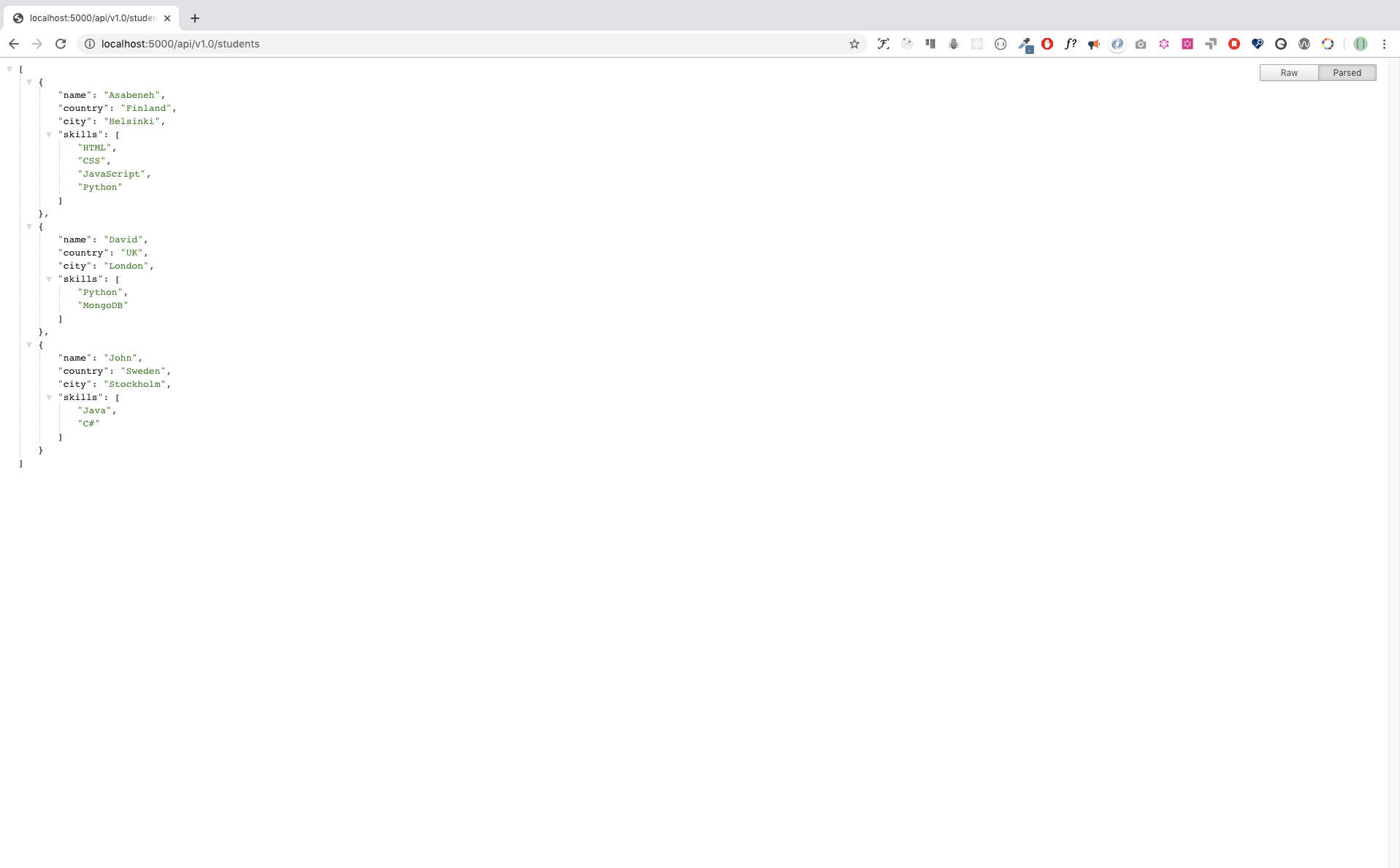
在浏览器中请求 http://localhost:5000/api/v1.0/students 时,你会看到:
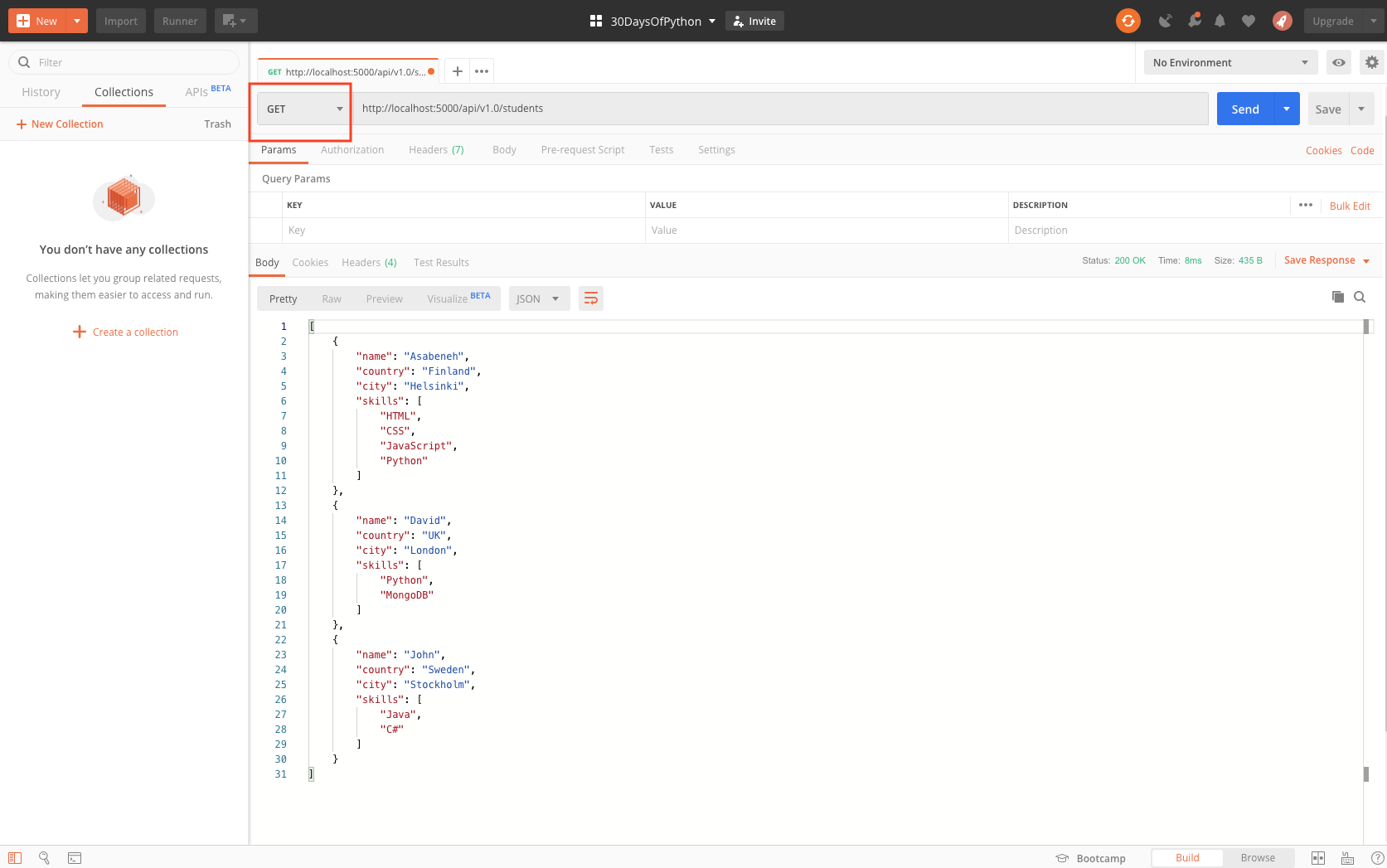
在 Postman 中请求 http://localhost:5000/api/v1.0/students 时,你会看到:
不再显示虚拟数据,我们把 Flask 应用连接到 MongoDB,并从 MongoDB 数据库获取数据。
# let's import the flask

from flask import Flask,  Response
import json
import pymongo
import os

app = Flask(__name__)

#
MONGODB_URI='mongodb+srv://asabeneh:your_password@30daysofpython-twxkr.mongodb.net/test?retryWrites=true&w=majority'
client = pymongo.MongoClient(MONGODB_URI)
db = client['thirty_days_of_python'] # accessing the database

@app.route('/api/v1.0/students', methods = ['GET'])
def students ():

    return Response(json.dumps(student), mimetype='application/json')


if __name__ == '__main__':
    # for deployment
    # to make it work for both production and development
    port = int(os.environ.get("PORT", 5000))
    app.run(debug=True, host='0.0.0.0', port=port)
连接 Flask 后,我们可以从 thirty_days_of_python 数据库中获取 students 集合的数据。
[
    {
        "_id": {
            "$oid": "5df68a21f106fe2d315bbc8b"
        },
        "name": "Asabeneh",
        "country": "Finland",
        "city": "Helsinki",
        "age": 38
    },
    {
        "_id": {
            "$oid": "5df68a23f106fe2d315bbc8c"
        },
        "name": "David",
        "country": "UK",
        "city": "London",
        "age": 34
    },
    {
        "_id": {
            "$oid": "5df68a23f106fe2d315bbc8e"
        },
        "name": "Sami",
        "country": "Finland",
        "city": "Helsinki",
        "age": 25
    }
]
根据 id 获取文档⚓︎
我们可以用 id 访问单条文档,下面用 Asabeneh 的 id 访问他。 http://localhost:5000/api/v1.0/students/5df68a21f106fe2d315bbc8b
# let's import the flask

from flask import Flask,  Response
import json
from bson.objectid import ObjectId
import json
from bson.json_util import dumps
import pymongo
import os

app = Flask(__name__)

#
MONGODB_URI='mongodb+srv://asabeneh:your_password@30daysofpython-twxkr.mongodb.net/test?retryWrites=true&w=majority'
client = pymongo.MongoClient(MONGODB_URI)
db = client['thirty_days_of_python'] # accessing the database

@app.route('/api/v1.0/students', methods = ['GET'])
def students ():

    return Response(json.dumps(student), mimetype='application/json')
@app.route('/api/v1.0/students/<id>', methods = ['GET'])
def single_student (id):
    student = db.students.find({'_id':ObjectId(id)})
    return Response(dumps(student), mimetype='application/json')

if __name__ == '__main__':
    # for deployment
    # to make it work for both production and development
    port = int(os.environ.get("PORT", 5000))
    app.run(debug=True, host='0.0.0.0', port=port)
[
    {
        "_id": {
            "$oid": "5df68a21f106fe2d315bbc8b"
        },
        "name": "Asabeneh",
        "country": "Finland",
        "city": "Helsinki",
        "age": 38
    }
]
使用 POST 创建数据⚓︎
我们使用 POST 请求方法创建数据。
# let's import the flask

from flask import Flask,  Response
import json
from bson.objectid import ObjectId
import json
from bson.json_util import dumps
import pymongo
from datetime import datetime
import os

app = Flask(__name__)

#
MONGODB_URI='mongodb+srv://asabeneh:your_password@30daysofpython-twxkr.mongodb.net/test?retryWrites=true&w=majority'
client = pymongo.MongoClient(MONGODB_URI)
db = client['thirty_days_of_python'] # accessing the database

@app.route('/api/v1.0/students', methods = ['GET'])
def students ():

    return Response(json.dumps(student), mimetype='application/json')
@app.route('/api/v1.0/students/<id>', methods = ['GET'])
def single_student (id):
    student = db.students.find({'_id':ObjectId(id)})
    return Response(dumps(student), mimetype='application/json')
@app.route('/api/v1.0/students', methods = ['POST'])
def create_student ():
    name = request.form['name']
    country = request.form['country']
    city = request.form['city']
    skills = request.form['skills'].split(', ')
    bio = request.form['bio']
    birthyear = request.form['birthyear']
    created_at = datetime.now()
    student = {
        'name': name,
        'country': country,
        'city': city,
        'birthyear': birthyear,
        'skills': skills,
        'bio': bio,
        'created_at': created_at

    }
    db.students.insert_one(student)
    return ;
def update_student (id):
if __name__ == '__main__':
    # for deployment
    # to make it work for both production and development
    port = int(os.environ.get("PORT", 5000))
    app.run(debug=True, host='0.0.0.0', port=port)
使用 PUT 更新⚓︎
# let's import the flask

from flask import Flask,  Response
import json
from bson.objectid import ObjectId
import json
from bson.json_util import dumps
import pymongo
from datetime import datetime
import os

app = Flask(__name__)

#
MONGODB_URI='mongodb+srv://asabeneh:your_password@30daysofpython-twxkr.mongodb.net/test?retryWrites=true&w=majority'
client = pymongo.MongoClient(MONGODB_URI)
db = client['thirty_days_of_python'] # accessing the database

@app.route('/api/v1.0/students', methods = ['GET'])
def students ():

    return Response(json.dumps(student), mimetype='application/json')
@app.route('/api/v1.0/students/<id>', methods = ['GET'])
def single_student (id):
    student = db.students.find({'_id':ObjectId(id)})
    return Response(dumps(student), mimetype='application/json')
@app.route('/api/v1.0/students', methods = ['POST'])
def create_student ():
    name = request.form['name']
    country = request.form['country']
    city = request.form['city']
    skills = request.form['skills'].split(', ')
    bio = request.form['bio']
    birthyear = request.form['birthyear']
    created_at = datetime.now()
    student = {
        'name': name,
        'country': country,
        'city': city,
        'birthyear': birthyear,
        'skills': skills,
        'bio': bio,
        'created_at': created_at

    }
    db.students.insert_one(student)
    return
@app.route('/api/v1.0/students/<id>', methods = ['PUT']) # this decorator create the home route
def update_student (id):
    query = {"_id":ObjectId(id)}
    name = request.form['name']
    country = request.form['country']
    city = request.form['city']
    skills = request.form['skills'].split(', ')
    bio = request.form['bio']
    birthyear = request.form['birthyear']
    created_at = datetime.now()
    student = {
        'name': name,
        'country': country,
        'city': city,
        'birthyear': birthyear,
        'skills': skills,
        'bio': bio,
        'created_at': created_at

    }
    db.students.update_one(query, student)
    # return Response(dumps({"result":"a new student has been created"}), mimetype='application/json')
    return
def update_student (id):
if __name__ == '__main__':
    # for deployment
    # to make it work for both production and development
    port = int(os.environ.get("PORT", 5000))
    app.run(debug=True, host='0.0.0.0', port=port)
使用 DELETE 删除文档⚓︎
# let's import the flask

from flask import Flask,  Response
import json
from bson.objectid import ObjectId
import json
from bson.json_util import dumps
import pymongo
from datetime import datetime
import os

app = Flask(__name__)

#
MONGODB_URI='mongodb+srv://asabeneh:your_password@30daysofpython-twxkr.mongodb.net/test?retryWrites=true&w=majority'
client = pymongo.MongoClient(MONGODB_URI)
db = client['thirty_days_of_python'] # accessing the database

@app.route('/api/v1.0/students', methods = ['GET'])
def students ():

    return Response(json.dumps(student), mimetype='application/json')
@app.route('/api/v1.0/students/<id>', methods = ['GET'])
def single_student (id):
    student = db.students.find({'_id':ObjectId(id)})
    return Response(dumps(student), mimetype='application/json')
@app.route('/api/v1.0/students', methods = ['POST'])
def create_student ():
    name = request.form['name']
    country = request.form['country']
    city = request.form['city']
    skills = request.form['skills'].split(', ')
    bio = request.form['bio']
    birthyear = request.form['birthyear']
    created_at = datetime.now()
    student = {
        'name': name,
        'country': country,
        'city': city,
        'birthyear': birthyear,
        'skills': skills,
        'bio': bio,
        'created_at': created_at

    }
    db.students.insert_one(student)
    return
@app.route('/api/v1.0/students/<id>', methods = ['PUT']) # this decorator create the home route
def update_student (id):
    query = {"_id":ObjectId(id)}
    name = request.form['name']
    country = request.form['country']
    city = request.form['city']
    skills = request.form['skills'].split(', ')
    bio = request.form['bio']
    birthyear = request.form['birthyear']
    created_at = datetime.now()
    student = {
        'name': name,
        'country': country,
        'city': city,
        'birthyear': birthyear,
        'skills': skills,
        'bio': bio,
        'created_at': created_at

    }
    db.students.update_one(query, student)
    # return Response(dumps({"result":"a new student has been created"}), mimetype='application/json')
    return
@app.route('/api/v1.0/students/<id>', methods = ['PUT']) # this decorator create the home route
def update_student (id):
    query = {"_id":ObjectId(id)}
    name = request.form['name']
    country = request.form['country']
    city = request.form['city']
    skills = request.form['skills'].split(', ')
    bio = request.form['bio']
    birthyear = request.form['birthyear']
    created_at = datetime.now()
    student = {
        'name': name,
        'country': country,
        'city': city,
        'birthyear': birthyear,
        'skills': skills,
        'bio': bio,
        'created_at': created_at

    }
    db.students.update_one(query, student)
    # return Response(dumps({"result":"a new student has been created"}), mimetype='application/json')
    return ;
@app.route('/api/v1.0/students/<id>', methods = ['DELETE'])
def delete_student (id):
    db.students.delete_one({"_id":ObjectId(id)})
    return
if __name__ == '__main__':
    # for deployment
    # to make it work for both production and development
    port = int(os.environ.get("PORT", 5000))
    app.run(debug=True, host='0.0.0.0', port=port)
💻 练习:第 29 天⚓︎
- 实现上面的示例,并开发 这个应用。